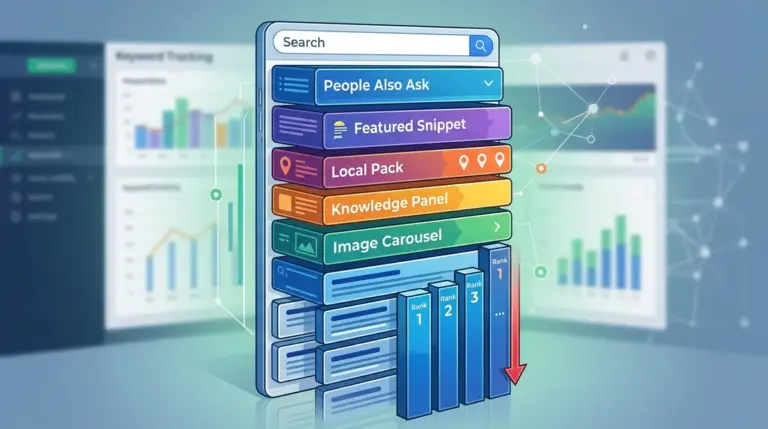
Relying on a single, nationwide ranking metric is the fastest way to misread organic performance. In the current search ecosystem, the "national average" is a statistical abstraction that rarely reflects what a real user sees on their screen. Google’s transition toward a mobile-first, hyper-localized index means that search results are now tethered to precise geographic coordinates, often down to the neighborhood or zip code level. For SEO professionals, failing to account for these location settings leads to "ghost rankings"—data that looks promising in a report but fails to generate actual traffic or conversions because the site is invisible in high-value regions.
The Proximity Layer in Non-Local Keywords
A common misconception is that location distortion only affects "near me" queries or service-based businesses like plumbers and law firms. In reality, Google applies a localization layer to a vast range of informational and commercial keywords. Even for broad terms like "enterprise software" or "cloud hosting," the search engine may prioritize results from companies with a physical presence or a data center near the user to reduce latency or provide regionally relevant case studies.
When a rank tracker simulates a search from a generic data center IP rather than a specific residential zip code, it bypasses this proximity layer. This results in a "sanitized" SERP that does not exist for the target audience. If your tracking tool reports a stable position 3, but your Google Search Console data shows a declining CTR, the discrepancy is often found in localized SERP features—such as local packs or "People Also Ask" blocks—that vary by city and push organic results further down the fold.
Technical Triggers for SERP Personalization
Google uses three primary signals to determine a user's location, each of which can distort your data if not mirrored correctly in your tracking setup:
- IP Geocoding: The most basic level, identifying the user's city or region based on their internet service provider.
- HTML5 Geolocation: Precise coordinates provided by mobile devices and modern browsers, which Google uses to trigger the most aggressive local filters.
- Search History and Account Data: Logged-in users receive results influenced by their previous movements and "home/work" settings in Google Maps.
If your tracking software uses a static IP address from a Virginia-based AWS server to check rankings for a client in Los Angeles, the data is fundamentally compromised. The search engine recognizes the data center origin and often serves a generic, non-localized version of the SERP that ignores the competitive landscape of the actual target market.
Warning: Relying on VPNs to "spot check" rankings is notoriously unreliable. Google easily identifies most commercial VPN exit nodes and may serve "soft-blocked" or captcha-heavy results that do not reflect the true organic landscape for a local resident.
The Hidden Cost of "Global" Averages
Aggregating ranking data at a country level masks regional volatility. A brand might hold the top spot in New York and Chicago but fall to the second page in Houston and Phoenix. If you only look at the national average, the brand appears to be performing well at position 5. However, this average hides the fact that you are losing significant market share in two of the top five US markets.
For agencies, this distortion creates a reporting liability. Presenting a client with a "National Rank" that doesn't align with their regional sales figures erodes trust. Commercial utility in SEO comes from identifying where the "ranking gaps" exist geographically and adjusting local content or backlink strategies to compensate. Without location-specific tracking, you are essentially flying blind through regional market shifts.
How to Calibrate Tracking for Accuracy
To eliminate location-based noise, your tracking strategy must move beyond the "Country" setting. Accurate data requires a granular approach that mirrors the actual distribution of your customer base.
Step 1: Identify High-Value Geographies. Use Google Analytics to find the top 10 cities or zip codes driving the most revenue. These are the locations where your rank tracking must be pinpoint accurate.
Step 2: Use Zip-Code Level Tracking. In competitive niches, even city-level tracking is too broad. Search results in Manhattan can differ significantly from results in Brooklyn. Setting your tracking to specific zip codes ensures you are seeing the same SERP features—including the Local Pack—that your customers see.
Step 3: Monitor SERP Feature Volatility. Localization often changes which SERP features appear. In some cities, Google may show a "Products" grid for a keyword, while in others, it shows a "Top Stories" carousel. Tracking these variations allows you to optimize your schema and content type for the specific local intent.
Aligning Data with Regional Business Goals
The goal of SEO is not to rank everywhere for everyone; it is to rank where the profit is. By narrowing the focus of your rank tracking to specific, high-intent locations, you reduce the "noise" of irrelevant data. This allows for a more aggressive optimization strategy. For instance, if you discover you are ranking poorly in a specific high-income zip code, you can deploy localized landing pages or Google Business Profile updates targeted specifically at that micro-market.
This level of precision transforms rank tracking from a vanity metric into a diagnostic tool. It moves the conversation away from "Where do we rank in the US?" to "Why are we losing the Seattle market to a local competitor?" The latter is a question that can be answered with specific, actionable SEO tactics.
Establishing a Precise Monitoring Protocol
To ensure your data remains commercially useful, implement a quarterly audit of your location settings. Markets change, and Google’s sensitivity to proximity fluctuates with algorithm updates. A keyword that was "global" last year may be "hyper-local" today.
- Compare rank tracking data against Google Search Console’s "Appearance" and "Location" filters to verify alignment.
- Track competitors who have a physical presence in your target cities to see if they are gaining an "unfair" proximity advantage.
- Adjust your tracking to include mobile-specific locations, as mobile SERPs are significantly more sensitive to GPS data than desktop SERPs.
FAQ
Does location matter for B2B SaaS keywords?
Yes. While less dramatic than "pizza delivery," Google still uses data centers and regional business signals to tailor results. Competitors with local offices or localized landing pages often see a ranking boost in those specific regions.
Why does my rank tracker show position 1 while my phone shows position 5?
This is likely due to the "Local Layer." Your phone uses precise GPS and search history, whereas a tracker might be using a city-level IP. Ensure your tracker is set to the same zip code as your physical location for an accurate comparison.
Can I just use the 'near' parameter in Google search URLs?
The &near= parameter is increasingly deprecated and unreliable. Google now prioritizes the 'uule' parameter or encrypted location headers, which are more difficult to manipulate manually but are handled by professional rank tracking APIs.
Is it better to track by city or by zip code?
For local services (HVAC, Legal, Medical), zip code tracking is essential. For national e-commerce or informational sites, city-level tracking for your top 5-10 markets is usually sufficient to identify regional trends.