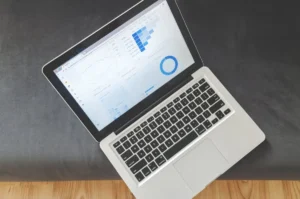
A keyword rank control panel is a centralized dashboard that shows how your tracked keywords move over time, how much search visibility you own across target topics, where rankings are concentrated or thin, and which changes need action first. For SEO teams and marketers, it turns daily ranking updates into decisions: which pages to improve, which keyword groups are gaining traction, which markets need attention, and whether recent optimizations are working.
What a keyword rank control panel does
The control panel brings together the ranking signals that matter most in one place. Instead of checking individual keywords one by one, you can review performance by keyword set, landing page, device, location, search engine, or campaign segment. The goal is not just to report positions, but to show movement, visibility, and ranking distribution in a way that supports action.
A practical control panel typically tracks current positions, day-over-day or week-over-week movement, share of rankings in key bands such as top 3, top 10, and top 20, and visibility trends across your tracked portfolio. It also highlights volatility, new entries, dropped terms, and pages that rank for multiple valuable queries.
Core metrics that make ranking data useful
Keyword movement
Movement is the fastest way to spot change. A control panel should show which keywords improved, declined, or stayed flat over a selected period. This matters because a keyword moving from position 11 to 8 often deserves more attention than one moving from 48 to 42. The first shift can materially change traffic potential.
Search visibility
Visibility summarizes how prominent your tracked keywords are in search results. Rather than focusing on a single term, visibility shows whether your overall footprint is expanding or contracting. This helps teams evaluate campaign impact at a portfolio level, especially when rankings fluctuate across dozens or hundreds of terms.
Ranking spread
Ranking spread shows how your keywords are distributed across position ranges. If most terms sit in positions 11 to 20, you likely have a strong near-page-one opportunity. If your spread is concentrated in positions 1 to 3 for branded terms but weak for non-branded terms, the panel exposes that imbalance immediately.
Tracking cadence
Cadence determines how quickly you can detect meaningful changes. Daily tracking is usually best for active campaigns, competitive categories, and pages that were recently updated. Weekly tracking may be enough for lower-priority keyword sets or long-cycle content programs. The control panel should make cadence visible so teams know whether they are looking at fresh signals or slower trend data.
When to use a keyword rank control panel
Use it when you need to monitor performance consistently and turn ranking data into prioritization. It is especially useful after publishing new landing pages, updating important content, changing internal linking, rolling out title tag revisions, or entering a new location or product category. It also becomes essential when multiple stakeholders need a shared view of SEO progress.
For in-house teams, the control panel helps connect rankings to page-level ownership and reporting cycles. For agencies, it supports client communication by showing measurable movement and highlighting where work is producing gains. For ecommerce and lead generation teams, it helps identify which keyword clusters are close to stronger visibility and where competitors are taking ground.
How SEO teams use ranking data to make decisions
Prioritize near-win keywords
Keywords ranking just outside the top 10 often offer the best return on effort. A control panel makes these terms easy to isolate so teams can improve the associated pages with better on-page targeting, stronger internal links, refreshed copy, or more relevant supporting content.
Identify page cannibalization
If multiple URLs appear for the same keyword group over time, the panel can reveal unstable ranking ownership. That is often a sign to consolidate content, strengthen canonical signals, or clarify page intent.
Measure the effect of SEO changes
After a content refresh or technical fix, ranking movement should be reviewed against the date of the change. A good control panel helps teams compare before-and-after periods so they can separate normal fluctuation from real improvement.
Segment by market and device
Desktop and mobile rankings can behave differently, and local intent can vary by city or region. Segmenting performance inside the control panel helps teams avoid broad assumptions and make more accurate optimization decisions.
Practical benefits
- Spot ranking declines before they affect larger keyword groups
- Find page-one opportunities faster by filtering position bands
- Compare branded and non-branded visibility clearly
- Track campaign impact across locations, devices, and landing pages
- Give stakeholders a simple view of SEO progress without manual reporting
What to include in a useful control panel
A practical setup should group keywords by business priority, not just topic. That means separating revenue-driving terms, informational support terms, branded queries, and local or product-specific sets. The panel should also connect keywords to landing pages so ranking changes can be tied to a page owner and next step.
Useful filters include search intent, location, device, tag, keyword cluster, and ranking band. Alerting is also valuable. If a high-priority keyword drops out of the top 10 or a tracked page gains multiple new top-3 positions, the team should know quickly.
For reporting, trend lines should be paired with distribution snapshots. A visibility graph is helpful, but it becomes much more actionable when combined with a view showing how many keywords sit in positions 1 to 3, 4 to 10, 11 to 20, and beyond.
Short workflow example
An SEO manager reviews the control panel every Monday morning. They filter for non-branded keywords in positions 8 to 15, then sort by weekly movement and business value. One product category page has five terms sitting between positions 9 and 13, with two declining slightly on mobile. The manager assigns a content update, adds internal links from related guides, and schedules a technical check for mobile page speed. Over the next two weeks, the panel shows three of those terms entering the top 10 and visibility for that category rising.
How often to review the control panel
Daily review makes sense for high-value campaigns, volatile search spaces, and active optimization periods. Weekly review is often enough for broader editorial programs and executive reporting. Monthly review alone is usually too slow for teams that need to catch declines, validate changes, or capitalize on emerging gains. The right cadence depends on how quickly your team can act on the data, but the control panel should support both fast checks and longer trend analysis.
FAQ
What is the difference between keyword movement and search visibility?
Keyword movement shows position changes for individual terms. Search visibility summarizes overall ranking presence across your tracked keyword set.
How many keywords should a control panel track?
Track enough keywords to reflect your priority pages, core topics, and markets. Most teams start with high-intent and high-value terms, then expand into supporting clusters.
Is daily tracking necessary?
Not always. Daily tracking is best for active campaigns and competitive sectors. Weekly tracking can work for lower-priority groups where trend direction matters more than short-term fluctuation.
What should I do when rankings drop?
Check whether the drop affects one keyword, one page, or an entire cluster. Then review recent page changes, competitor movement, device or location differences, and whether the page still matches search intent.